


Go back

Where Does Sensitive Data Accumulate in Google Workspace? Your Inbox

Gmail naturally accumulates long-lived sensitive data, relationship context, and built-in distribution mechanisms, making the inbox a major data store and breach multiplier that requires a security strategy focused on reducing accumulation and optimizing time-to-containment.

Data Security
January 14, 2026
author
Material Security Team
share

When teams talk about Google Workspace security, the conversation usually starts (and ends) with phishing.

That makes sense—email is a primary entry point.

But there’s a quieter, often bigger issue hiding in plain sight: Gmail becomes one of your most valuable data repositories. Not because anyone designed it that way, but because it’s where business naturally accumulates over time.

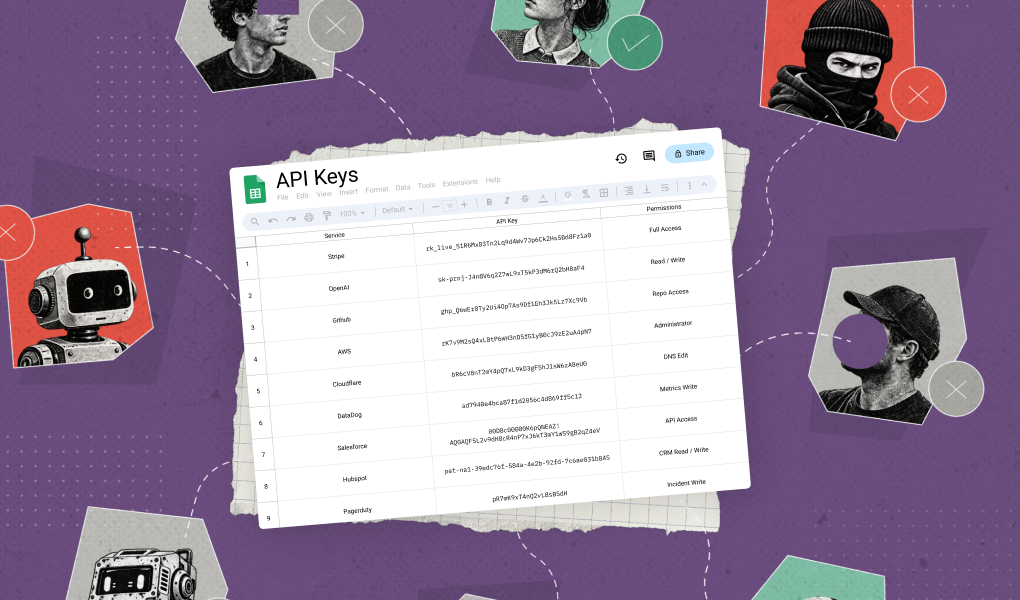
Contracts get emailed. Invoices get approved. Customer files get shared. Incident details get discussed. Product plans get forwarded. HR docs get attached. Credentials and API keys get pasted in a pinch. Months turn into years—and suddenly your inboxes contain a high-fidelity history of the company.

So the question isn’t only “Can we stop malicious emails?”
It’s also: “If someone gets into a mailbox, what do they get access to?”

If you want the broader strategic roadmap for Gmail security (threats, identity, response, and data), start here: A Pragmatic Guide to Gmail Security

Why Gmail becomes a breach multiplier

A compromised mailbox is rarely just a privacy incident. It’s often a business-impact event because Gmail concentrates three things attackers love:

1) Long-lived sensitive data

Gmail’s value to attackers increases with time. The longer you’ve been operating, the more likely inboxes contain:

  • contracts, legal negotiations, and renewal terms
  • customer data (PII), support exports, spreadsheets
  • financial details (bank info, invoices, payment flows)
  • internal strategy (roadmaps, board materials)
  • credentials, links, and shared access paths

Even if your Drive governance is strong, email is where sensitive data arrives first—and often stays.

2) Relationship context

Inboxes capture the “social graph” of your business: who you work with, who approves what, and how requests typically sound. That context enables high-confidence impersonation (e.g., vendor change requests, wire instructions) and makes targeted attacks more believable.

3) Built-in distribution mechanisms

Once inside, attackers don’t need to “hack” data out of the company. They can use everyday email behaviors:

  • search + export patterns
  • forwarding rules
  • third-party app access (OAuth)
  • sending “follow-ups” from real threads
  • exfiltration through attachments and shared links

The inbox is both the archive and the launchpad.

The strategic mistake: treating Gmail like a transport layer

Most security programs are built around systems of record: databases, file stores, ticketing tools.

Email isn’t treated like that—until something goes wrong.

But Gmail behaves like a system of record in practice:

  • It holds final versions of documents that never make it into Drive.
  • It captures approvals and exceptions that bypass formal workflows.
  • It preserves attachments that become the de facto source of truth.

When you secure Gmail as if it’s only “messages in motion,” you miss the bigger risk: messages at rest.

Why “just do DLP” is harder in Gmail than people expect

A lot of teams try to solve inbox data risk with classic DLP thinking: detect patterns, block exfiltration, call it done.

The reality is more nuanced:

  • Email is unstructured. Sensitive info can be in bodies, threads, images, or attachments.
  • Context matters. The same file is fine internally but risky externally.
  • False positives are expensive. If controls interrupt business (sales, finance), they get bypassed or disabled.
  • Remediation doesn’t scale manually. Even if you detect exposure, cleaning up inbox history account-by-account is not sustainable.

So the strategic goal isn’t “deploy DLP rules.”
It reduces the amount of sensitive data that accumulates in Gmail and make governance continuous and low-friction.

A strategy for reducing Gmail data risk (without slowing the business)

You don’t need a hundred controls. You need a few principles that shape behavior and reduce blast radius.

1) Treat inboxes like endpoints, not archives

Your program should assume: mailboxes will be compromised eventually. The question is how much value they yield.

A strong posture aims to:

  • reduce sensitive-data accumulation in mailboxes
  • reduce retention of high-risk data
  • make high-value accounts harder targets
  • make post-compromise access visible and containable

2) Prioritize “tier-0 mailboxes”

Not all inboxes are equal. Execs, finance, HR, IT/admins, and anyone handling customer exports or legal docs have outsized risk.

If you do nothing else, make sure your strategy explicitly addresses high-value inboxes:

  • stronger access posture
  • clearer governance expectations
  • tighter monitoring and faster response

3) Optimize for “time-to-containment,” not perfect prevention

Inbox data risk is as much about response as it is about prevention.

Ask:

  • How quickly can we determine what a compromised user accessed?
  • How quickly can we identify the sensitive conversations/attachments exposed?
  • How quickly can we remove persistence and prevent repeat access?

If those answers involve days of manual searching, your strategy will fail under pressure.

4) Make the “right place for sensitive files” obvious

The best way to keep sensitive data out of Gmail is to make the safer workflow simpler:

  • drive sensitive collaboration into managed repositories (Drive, shared drives, approved systems)
  • reduce attachment-heavy processes that create shadow archives
  • standardize how teams share sensitive files (so security isn’t reinvented per department)

This is less about enforcement and more about productivity-aligned defaults.

5) Measure what matters: inbox data exposure risk

You can’t manage what you can’t measure. A mature program tracks leading indicators like:

  • sensitive data concentration in high-risk inboxes
  • external sharing patterns via email attachments/links
  • third-party app access patterns
  • repeat exposure sources (teams/processes generating the most inbox risk)

Metrics turn “email is messy” into something you can actually reduce.

What this means for Google Workspace security overall

If your Google Workspace plan is:

  1. turn on email filtering
  2. enforce MFA

…then you’ve covered important basics—but you’ve left a major breach multiplier untouched.

A more complete strategy recognizes:

  • Gmail is both entry point and data store
  • compromise risk compounds with retention + history
  • scalable security requires low-friction governance + fast containment

Want to know whether your Gmail defenses are really configured to stop today’s threats? Take the Google Workspace Scorecard for a fast, practical readout and next-step recommendations.
Related posts

Our blog is your destination for expert insights, practical tips, and the latest news in technology. Stay informed with our regular updates and in-depth articles. Join the conversation and enhance your understanding of the tech landscape.

blog post

The Quiet Phish: Stopping Calendar Invitation Attacks

Learn how to mitigate the risk posted by calendar invitation attacks against Google Workspace and Microsoft 365 accounts.

Rajan Kapoor, VP, Security
5
m read
Read post
Podcast

The Quiet Phish: Stopping Calendar Invitation Attacks

Learn how to mitigate the risk posted by calendar invitation attacks against Google Workspace and Microsoft 365 accounts.

5
m listen
Listen to episode
Video

The Quiet Phish: Stopping Calendar Invitation Attacks

Learn how to mitigate the risk posted by calendar invitation attacks against Google Workspace and Microsoft 365 accounts.

5
m watch
Watch video
Downloads

The Quiet Phish: Stopping Calendar Invitation Attacks

Learn how to mitigate the risk posted by calendar invitation attacks against Google Workspace and Microsoft 365 accounts.

5
m listen
Watch video
Webinar

The Quiet Phish: Stopping Calendar Invitation Attacks

Learn how to mitigate the risk posted by calendar invitation attacks against Google Workspace and Microsoft 365 accounts.

5
m listen
Listen episode
blog post

A Time to Build, a Time to Buy - How to Make a Choice

Building security tools in-house is seductive but often leads to costly, resource-draining tech debt, making buying a customizable platform the smarter choice unless the problem involves unique trust issues, an unserved market, or highly specialized environment logic.

Rajan Kapoor, VP, Security
5
m read
Read post
Podcast

A Time to Build, a Time to Buy - How to Make a Choice

Building security tools in-house is seductive but often leads to costly, resource-draining tech debt, making buying a customizable platform the smarter choice unless the problem involves unique trust issues, an unserved market, or highly specialized environment logic.

5
m listen
Listen to episode
Video

A Time to Build, a Time to Buy - How to Make a Choice

Building security tools in-house is seductive but often leads to costly, resource-draining tech debt, making buying a customizable platform the smarter choice unless the problem involves unique trust issues, an unserved market, or highly specialized environment logic.

5
m watch
Watch video
Downloads

A Time to Build, a Time to Buy - How to Make a Choice

Building security tools in-house is seductive but often leads to costly, resource-draining tech debt, making buying a customizable platform the smarter choice unless the problem involves unique trust issues, an unserved market, or highly specialized environment logic.

5
m listen
Watch video
Webinar

A Time to Build, a Time to Buy - How to Make a Choice

Building security tools in-house is seductive but often leads to costly, resource-draining tech debt, making buying a customizable platform the smarter choice unless the problem involves unique trust issues, an unserved market, or highly specialized environment logic.

5
m listen
Listen episode
blog post

Context Is Everything: Sharpening Account Takeover Detection with Network Intelligence

Material elevates Account Takeover (ATO) detection beyond basic IP logging by integrating real-time network intelligence from Spur, instantly differentiating legitimate remote work from sophisticated proxy-based attacks.

Mike Moran, Ph.D.
7
m read
Read post
Podcast

Context Is Everything: Sharpening Account Takeover Detection with Network Intelligence

Material elevates Account Takeover (ATO) detection beyond basic IP logging by integrating real-time network intelligence from Spur, instantly differentiating legitimate remote work from sophisticated proxy-based attacks.

7
m listen
Listen to episode
Video

Context Is Everything: Sharpening Account Takeover Detection with Network Intelligence

Material elevates Account Takeover (ATO) detection beyond basic IP logging by integrating real-time network intelligence from Spur, instantly differentiating legitimate remote work from sophisticated proxy-based attacks.

7
m watch
Watch video
Downloads

Context Is Everything: Sharpening Account Takeover Detection with Network Intelligence

Material elevates Account Takeover (ATO) detection beyond basic IP logging by integrating real-time network intelligence from Spur, instantly differentiating legitimate remote work from sophisticated proxy-based attacks.

7
m listen
Watch video
Webinar

Context Is Everything: Sharpening Account Takeover Detection with Network Intelligence

Material elevates Account Takeover (ATO) detection beyond basic IP logging by integrating real-time network intelligence from Spur, instantly differentiating legitimate remote work from sophisticated proxy-based attacks.

7
m listen
Listen episode
blog post

Beyond Block: Why Your Security Stack Needs More Verbs, not More Tools

Modern security demands organizations stop relying on perimeter blocking and adopt a richer vocabulary of proactive capabilities to manage risk dynamically inside collaborative cloud environments.

Nate Abbott
3
m read
Read post
Podcast

Beyond Block: Why Your Security Stack Needs More Verbs, not More Tools

Modern security demands organizations stop relying on perimeter blocking and adopt a richer vocabulary of proactive capabilities to manage risk dynamically inside collaborative cloud environments.

3
m listen
Listen to episode
Video

Beyond Block: Why Your Security Stack Needs More Verbs, not More Tools

Modern security demands organizations stop relying on perimeter blocking and adopt a richer vocabulary of proactive capabilities to manage risk dynamically inside collaborative cloud environments.

3
m watch
Watch video
Downloads

Beyond Block: Why Your Security Stack Needs More Verbs, not More Tools

Modern security demands organizations stop relying on perimeter blocking and adopt a richer vocabulary of proactive capabilities to manage risk dynamically inside collaborative cloud environments.

3
m listen
Watch video
Webinar

Beyond Block: Why Your Security Stack Needs More Verbs, not More Tools

Modern security demands organizations stop relying on perimeter blocking and adopt a richer vocabulary of proactive capabilities to manage risk dynamically inside collaborative cloud environments.

3
m listen
Listen episode
Privacy Preference Center

By clicking “Accept”, you agree to the storing of cookies on your device to enhance site navigation, analyze site usage, and assist in our marketing efforts. View our Privacy Policy for more information.

New