

Material is releasing a series of upgrades to our existing Google Drive capabilities to make it easier to detect and fix risky sharing so you can rest assured that information is flowing only where it’s both needed and allowed.
Google Drive is where your collected company knowledge lives, and it’s a key surface for collaboration between employees and their AI agents. Material is releasing a series of upgrades to our existing Google Drive capabilities to make it easier to detect and fix risky sharing so you can rest assured that information is flowing only where it’s both needed and allowed. Let’s take a look at what’s available now and what’s coming soon.
Now: Higher-precision Drive detections, out of the box
Thanks to a robust API connection to Google Workspace, Material gives rapid visibility into the contents of Google Drive and your company’s sharing habits. Last month’s release of the File Security Report provided an at-a-glance view of file sharing across the organization.
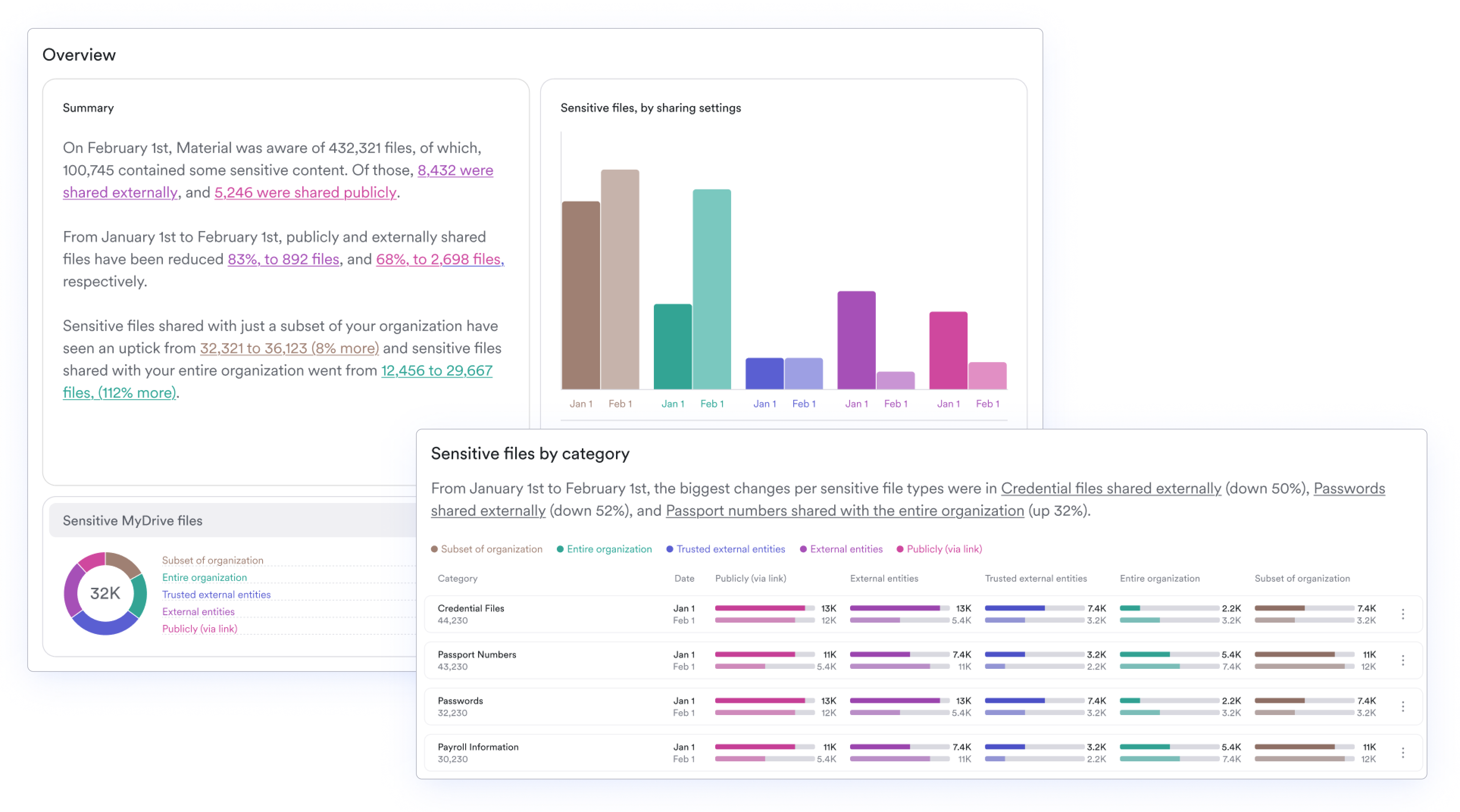
We’re building on this strong foundation with the release of more actionable Drive detections right at implementation. Since the launch of Drive security back in 2024, Material has detected sensitive content that lives within files. Feedback from our users let us know that it would be more helpful to separate these categories to get a more specific, granular view of risk. Today, categories like passwords, payroll information, and social security numbers result in separate detections, creating a clearer path to action on the information surfaced by Material.
Now: Natural language search to instant detection
There will still be times when the security team needs to search for specific keywords or parameters to lock down files. Confidential project names, M&A activity, and sensitive partner names all need to be protected from over-permissioned users and the agents that are searching everything on their behalf.
The natural language search capabilities we released last month have now extended to detection creation. Security analysts no longer need to choose between using MQL or structured searches to create new detection and repetitively searching using natural language. Now, they can simply describe the parameters of the detection they need and activate it so future document matches will trigger issues and appropriate resolutions. Don’t worry, MQL fans – you’ll still be able to query that way, too.
Next: More flexible remediations for overpermissioned files
Every organization has its own policies towards sharing files, and no security team wants employees to come at them with pitchforks and torches when they crack down by enforcing overly-strict policies. If an employee shares a board deck with a public link, the right move is probably to revoke permission first and worry about the consequences later. But if a marketing team member shares campaign assets with a consultant, the policy might be more flexible and include a 30-day grace period for external sharing before nudging them to close off access.
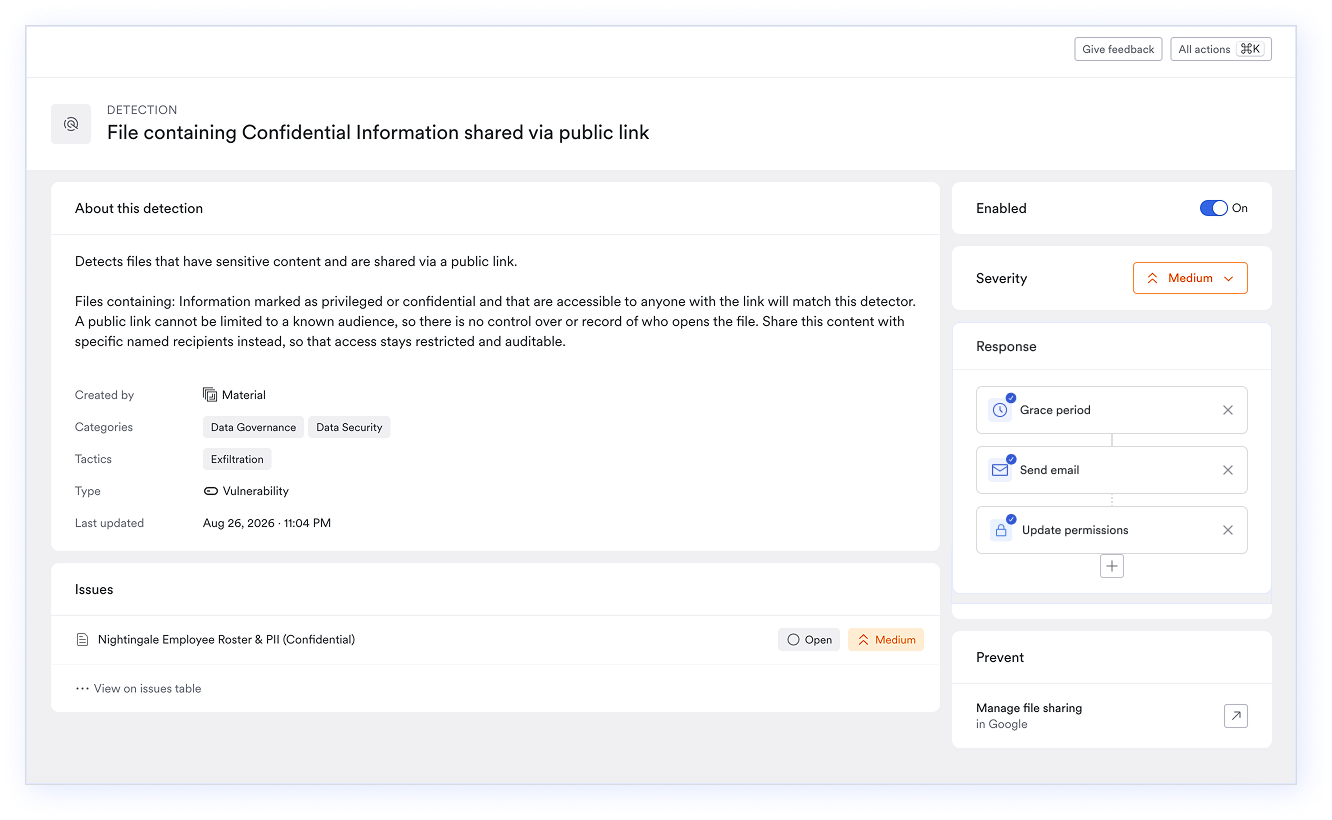
To make it easier to customize policies around specific content types, Material is introducing new remediation flow options. Security teams can choose the order of operations for notifications, grace periods, and remediation actions to better match their policies (and prevent any angry mob situations!).
In addition to making remediations more flexible, we’re also adding manual remediation options to more surfaces in Material. We’re introducing the ability to quickly remediate files from their corresponding issue and file detail pages so you don’t have to navigate to a detection page to fix over-sharing.
Next: Improved visibility into remediation activities
Some files are just peskier than others when it comes to oversharing. You may feel like you’re constantly right-sizing shares on files like customer lists, project plans, or slide decks from all hands. You don’t have to rely on Slack threads or personal memory of these access changes anymore, because Material is introducing an audit log to show what security actions have taken place on files, and when. If someone keeps resharing a file and Material locks it down repeatedly, you’ll be able to see when these changes took place.
Coming soon, you’ll also have the ability to add comments to the audit timeline. When context is needed, you’ll be able to see why a team member activated a remediation, or just remind yourself of what yesterday’s version of you was thinking.
The platform will also make it simpler to see when an automation didn’t do exactly what it was meant to do. You’ll see clearer error messages when a remediation step fails so you can go in and fix it.
See how Material helps tame Drive sprawl
Is it time to wrap your arms around what’s lurking in your Google Drive? Let us show you how Material speeds Drive cleanup, enforces sharing policies, and gets your team in great shape to fully adopt AI capabilities.